

HTB - Network Enumeration with Nmap Part2
Firewall and IDS/IPS Evasion
都是lab la
現實世界中會有一些防護設備(IDS/IPS等)去阻擋掃描,因此我們要進行繞過。
我們可以進行測試:
用 SYN vs ACK Scan 看出防火牆規則
SYN 掃描
使用--packet-trace查看封包:
舉例:
對 22:SYN → 回 SYN/ACK → Nmap 認定 open
對 21 / 25:射出 SYN,但什麼都沒回,Nmap 認定 filtered這代表:
- 22/tcp:防火牆放行
- 21/25:防火牆直接 drop
ACK 掃描
對 22:我們送 ACK,對方回 RST → Nmap 認為封包到得了,狀態 = unfiltered
對 21 / 25:還是沒回 → filtered
所以:- SYN scan 告訴你:「22 開,21/25 被檔」
- ACK scan 告訴你:「22 這條路 firewall 讓你進得來(unfiltered),21/25 直接被 drop」
Decoy當你怕 IPS 直接封鎖你的 IP,可以用 Decoy (-D) 讓 log 裡出現一串疑似攻擊來源
- Decoy 最好是活著的 IP,不然可能觸發對方的 SYN flood 防護。
- 很多 ISP / router 對於假來源 IP 的封包會直接丟掉,效果有限。
改 Source IP / Interface:測試不同來源規則
舉例:- -S
:假裝我的來源IP
-e tun0:指定從 tun0 介面(VPN)送出封包
這在實務常會看到,比如說只有內部VLAN能掃SMB,或是只有特定IP能掃某幾個port
- -S
用 DNS port 偽裝來源 port
舉例:- 加上
--source-port 53偽裝來源為DNS ncat -nv --source-port 53 10.129.2.28 50000- 原本被擋住的port變成直接NC當成FTP進去連線
- 加上
注意:
這些方法本質上就是在繞過既有安全策略。
只能在你被授權的範圍內使用。
很多IPS會記錄甚至直接封鎖異常來源,
包含Decoy / source-port trick / 反覆重試的 ACK 掃描。
實務 SOP:
- 先用正常 SYN / Connect 掃描,看哪些 port 是 open/filtered。
針對 filtered 的 port: - 用 ACK scan 判斷是不是單純 drop
- 用 不同來源 IP / 介面 測試規則差異
- 用 source-port 53/443 等「可信 port」 嘗試穿牆
整個過程要搭配 --packet-trace 觀察封包實際細節,才能知道為什麼被放行。
範例題目:Easy Lab
Our client wants to know if we can identify which operating system their provided machine is running on. Submit the OS name as the answer.
我們的客戶想知道我們是否可以識別他們提供的機器正在運行哪個操作系統。提交操作系統名稱作為答案。
官方的題目中寫道:
1 | |
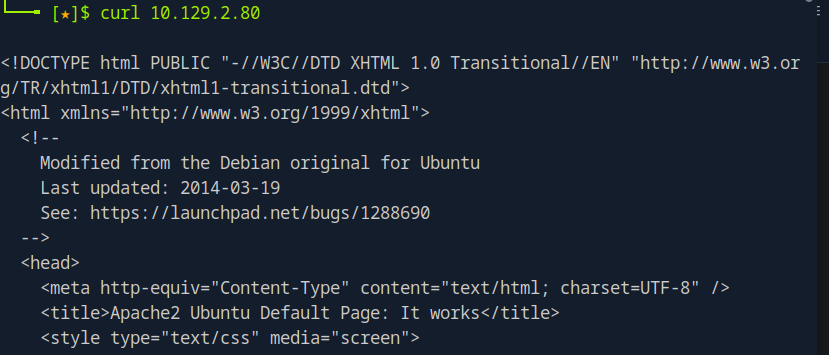
既然官方都給了說有一個http的網址
那我們直接請求即可。
範例題目:Medium Lab
After the configurations are transferred to the system, our client wants to know if it is possible to find out our target’s DNS server version. Submit the DNS server version of the target as the answer.
找出目標主機的 DNS server version,提交版本字串當答案。
題目中提到DNS,那我們可以依照前面寫的第四點用DNS偽裝來源進行掃描。
1 | |
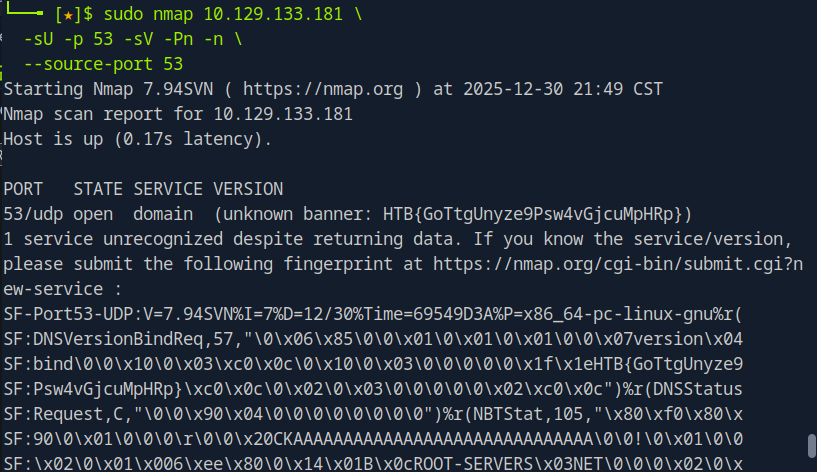
可以發現,答案就在banner裡面
範例題目:Hard Lab
Now our client wants to know if it is possible to find out the version of the running services. Identify the version of service our client was talking about and submit the flag as the answer.
尋找正在運行的服務版本以找到答案提交
這題要從頭到尾進行一次掃描
首先我們先查看有什麼port是開的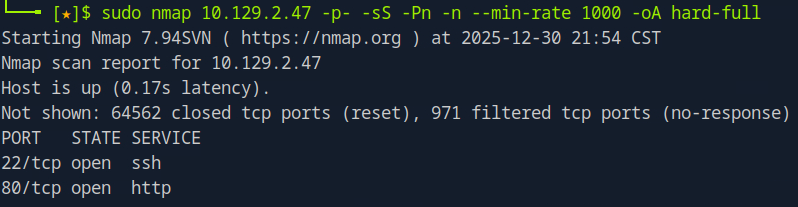
從這份輸出,我們知道:
- Host 是活的(Host is up)。
- 確定有兩個 TCP port 開著:22 / 80。
大部分 port 是:
- closed(目標有回 RST)
- 971 個是 filtered(完全沒回應)
這可以直接判斷:前面有防火牆 / IPS,在擋掃描。
所以接下來要做的事:
- 接下來要對 22/80 做深入枚舉。
- 使用不同參數再次進行掃描。
我們先從22/80開始深入掃描: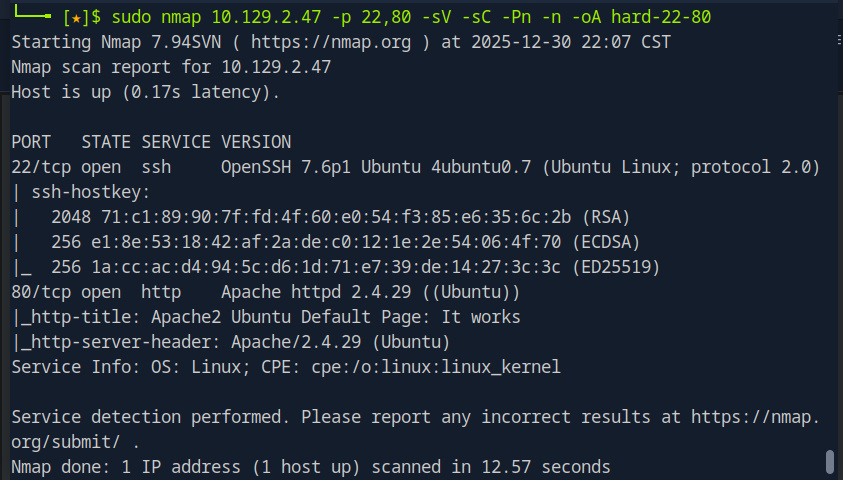
22 → OpenSSH on Ubuntu
80 → Apache 2.4.29 (Ubuntu),而且只是 Apache2 Ubuntu Default Page
目前為止沒看到什麼特別線索,也沒有 flag。
因此接下來我們改成不同參數再次進行掃描
這次我們來掃描常見的UDP服務: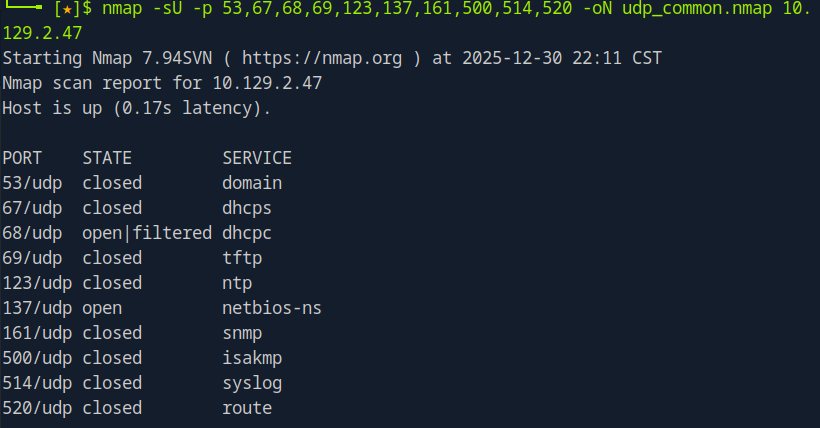
68/udp open|filtered dhcpc
這是 DHCP client 端常用的 port,open|filtered 代表 Nmap 只知道沒有 ICMP 回應,
但這邊無法確定是:
- 防火牆阻擋
- 還是上面真的有東西
這種通常比較難直接利用,先記在心裡就好。
137/udp open netbios-ns
NetBIOS name service,通常在 Windows 或跑 Samba 的機器上才會看到。
目前題目沒有要我們玩 NetBIOS,
真要挖可以用 nmblookup / smbclient 做名字枚舉,但跟這次課程的主題就有點遠了。
所以接下來我們需要再更改方向
既然知道對方有防火牆了,我們就使用來源偽裝,將我們的掃描來源port假裝成53 port(DNS發出的請求)
1 | |
因為跑很慢我就不再次截圖了(這篇筆記是我早就破完模組後又回來寫的)
會發現多看到了一個50000port是打開的。
我們使用NC去查看banner(同樣使用偽裝成53port的方式)
1 | |