

HTB - Brutus
In this very easy Sherlock, you will familiarize yourself with Unix auth.log and wtmp logs.
We’ll explore a scenario where a Confluence server was brute-forced via its SSH service. After gaining access to the server, the attacker performed additional activities, which we can track using auth.log. Although auth.log is primarily used for brute-force analysis, we will delve into the full potential of this artifact in our investigation, including aspects of privilege escalation, persistence, and even some visibility into command execution.
在這個非常簡單的 Sherlock 題目中,你將熟悉 Unix 的 auth.log 與 wtmp 日誌。
我們會探討一個情境:某台 Confluence 伺服器 的 SSH 服務 遭到暴力破解。攻擊者成功登入伺服器後,還進行了更多後續行為,而我們可以透過 auth.log 來追蹤這些活動。
雖然 auth.log 通常主要用來分析暴力破解行為,但在本次調查中,我們會更深入挖掘這個證據來源的完整潛力,包括:
- 權限提升(Privilege Escalation)
- 持久化(Persistence)
- 甚至能看到一些 指令執行(Command Execution)

字詞講解
auth.log = 認證/登入相關的日誌
在調查中常看:
- 暴力破解(brute force)
- 攻擊者來源 IP
- 哪個帳號被猜中
- 有沒有 sudo 提權、橫向移動痕跡
wtmp = 「登入歷史」的紀錄檔(偏統計紀錄)
特點:它不是純文字,是二進位檔、通常用 last 指令來看
在調查中常看:
- 攻擊者實際登入成功的時間點
- 是否有不正常的登入時間(例如凌晨 3:33)
- 哪個帳號登入最可疑
- 攻擊者有沒有反覆登入/登出
Confluence 是 Atlassian 出的企業內部 Wiki/文件系統
很多公司用來:
- 寫文件、維運手冊
- 做知識庫
- 記錄 SOP、流程、專案筆記
檔案說明
我們從官方檔案中拿到三個檔案,一個py檔,以及題目中所述的日誌檔。
查看py檔可以看到這是官方提供讀取wtmp用的程式
1 | |
從上述程式可以看到
它會用
open(input_file, "rb")讀取檔案內容。
假設一筆紀錄固定長度是384 bytes 一筆 record
那麼
offset = 0
offset += 384
offset += 384
…直到檔案讀取結束用 struct.unpack 解析每個欄位
具體欄位可看row那行
type 欄位則是會將數字轉換成可讀狀態
解題過程
Task 1
Analyze the auth.log. What is the IP address used by the attacker to carry out a brute force attack?
分析 auth.log 文件。攻擊者用來執行暴力破解攻擊的 IP 位址是什麼?
我們可以將所有Failed password的來源IP給顯示出來:
1 | |
如果你是使用linux答這題的話可以使用:grep "Failed password" auth.log | awk '{for(i=1;i<=NF;i++) if($i=="from") print $(i+1)}' | head
由於只有看到一個IP那麼連統計都不需要,直接提交答案即可。
Task 2
The bruteforce attempts were successful and attacker gained access to an account on the server. What is the username of the account?
暴力破解嘗試成功,攻擊者獲得了伺服器上一個帳戶的存取權限。該帳戶的使用者名稱是什麼?
首先我們統計攻擊者爆破的帳號清單:
1 | |
發現攻擊者測試了五種帳號。
接下來我們查看登入成功的log:
1 | |
從上述輸出可以看到第一個是管理員正常登入,後續兩個就是攻擊者爆破成功的紀錄。
至於最後一個同樣由攻擊者IP登入成功的帳號就能推論是攻擊者埋下的後門帳號(因為使用root太顯眼)
Task 3
Identify the UTC timestamp when the attacker logged in manually to the server and established a terminal session to carry out their objectives. The login time will be different than the authentication time, and can be found in the wtmp artifact.
確定攻擊者手動登入伺服器並建立終端會話以執行其目標的 UTC 時間戳記。登入時間與身份驗證時間不同,可以在 wtmp 工件中找到。
通常由於中間會有session 建立、PAM、環境初始化等動作,因此驗證成功跟建立連線間會有一分鐘左右的差距都是正常的。
因此我們要查詢的是真正建立terminal session的時間。
首先我們使用官方提供的腳本將wtmp轉檔:python .\utmp.py .\wtmp -o .\wtmp.tsv
轉檔後直接查詢:
1 | |
注意:由於我這邊是UTC +8,官方使用的時間是UTC,因此查到的時間需要再減去八小時才是正確答案。
Task 4
SSH login sessions are tracked and assigned a session number upon login. What is the session number assigned to the attacker’s session for the user account from Question 2?
SSH 登入會話會被跟踪,並在登入時分配一個會話號碼。問題 2 中攻擊者針對使用者帳號的會話被指派的會話號碼是多少?
讓我們回看第二題的輸出,攻擊者在auth.log:281的時候登入了第一次,在auth.log:322的時候登入了第二次,因此我們可以直接查看這中間的輸出。
由於有兩次登入紀錄,不確定哪個才是題目要的答案,因此我兩個ID都提交,第二次成功登入的ID才是正確答案。
查看行數的指令: (Get-Content .\auth.log)[起始行數..結束行數]
1 | |
Task 5
The attacker added a new user as part of their persistence strategy on the server and gave this new user account higher privileges. What is the name of this account?
攻擊者在其伺服器上新增了一個新用戶,作為其持久化策略的一部分,並賦予該新用戶帳戶更高的權限。該帳戶的名稱是什麼?
這題在前面的輸出中我們已經看到答案了,可以直接提交。
Task 6
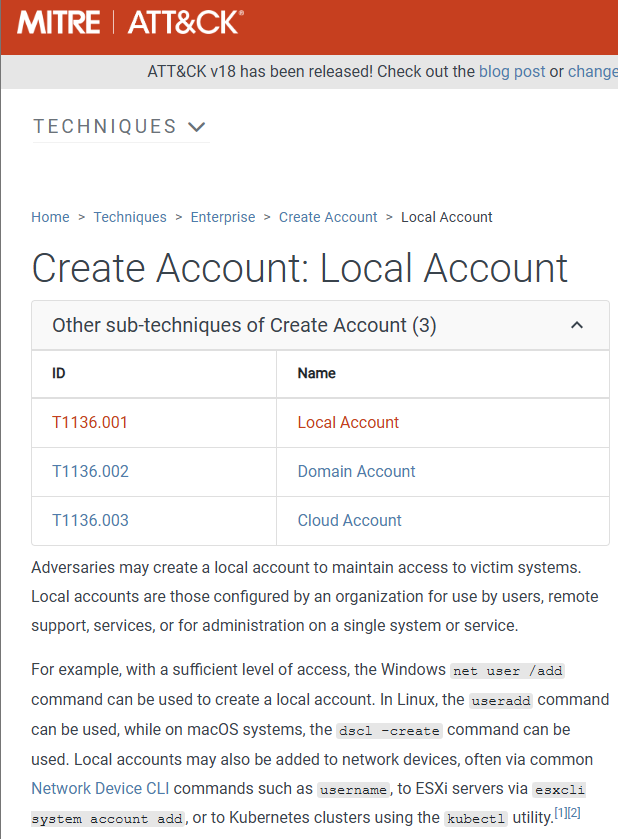
What is the MITRE ATT&CK sub-technique ID used for persistence by creating a new account?
建立新帳戶時,用於持久化的 MITRE ATT&CK 子技術 ID 是什麼?
這邊我們可以直接上瀏覽器查詢:建立帳號MITRE ATT&CK
點進去MITRE ATT&CK就能看到編號ID了
Task 7
What time did the attacker’s first SSH session end according to auth.log?
根據 auth.log 記錄,攻擊者的第一個 SSH 會話何時結束?
從第四題的輸出我們可以看到斷線時間,直接提交即可(記得轉換成官方指定格式)
Task 8
The attacker logged into their backdoor account and utilized their higher privileges to download a script. What is the full command executed using sudo?
攻擊者登入了他們的後門帳戶,並利用其更高的權限下載了一個腳本。使用 sudo 執行的完整命令是什麼?
既然題目已經寫得很清楚了,我們直接查詢sudo指令即可。
1 | |
這一個LAB到這邊就結束了,由於是簡單題主要是讓我們認識如何查詢。
由於我個人平時都用windows操作因此本篇都使用powershell進行解題。