
Atom
電腦桌寵製作_後端篇

電腦桌寵製作_後端篇

回顧一下我們的整體

  • 運行邏輯:
1
2
3
4
5
6
7
使用者輸入 → 
小洛伊接收 →
(呼叫記憶檢索)→
組合「個性 + 記憶 + 主人偏好」→
發給本地 LLM →
解析 →
Live2D 語音 + 動作 → 回覆主人
  • 環境架構:
1
2
3
4
5
[Web 前端+Live2D]  ←→  [後端 Node/Tauri]
↓ ↓
語音合成 (Kokoro) ←→ 本地 LLM (Qwen2.5-7B)
↑ ↑
└────── 記憶庫(SQLite / JSON)

環境準備

替代文字

AI模型環境我們使用ollama

1
2
3
4
//模型安裝
ollama pull qwen2.5
//模型測試
ollama run qwen2.5

接下來是專案骨架

1
2
3
4
5
6
7
8
9
D:\MiniLoy
├─ backend
│ ├─ prompts
│ ├─ data
│ ├─ config.json
│ ├─ server.js
│ └─ prompts\loy_v1.txt
└─ web
└─ index.html
  1. 首先我們初始化後端

    1
    2
    npm init -y
    npm install express cors
  2. 接下來撰寫設定檔

    1
    2
    3
    4
    5
    6
    7
    8
    9
    10
    11
    12
    13
    14
    15
    16
    17
    18
    19
    20
    21
    22
    23
    24
    25
    26
    27
    28
    29
    30
    31
    32
    33
    {
    "assistant": {
    "name": "Mini-Loy",
    "language": "en",
    "persona": "soft_boy",
    "description": "A gentle, soft-spoken teenage boy AI assistant."
    },

    "llm": {
    "provider": "ollama",
    "model": "qwen2.5"
    },

    "tts": {
    "provider": "custom",
    "endpoint": "http://localhost:8000/tts",
    "voice": "soft-boy",
    "language": "en"
    },

    "reminder": {
    "drink_water_interval_min": 45,
    "break_interval_min": 60,
    "enable_night_silence": true,
    "night_silence_start": "23:00",
    "night_silence_end": "07:00"
    },

    "memory": {
    "type": "json",
    "path": "./data/memory.json"
    }
    }

    這邊注意:實際上吃的檔案是以server為主,這邊是方便我們自己看得。

  3. 撰寫人設Prompt
    這邊依照你自己的喜好去寫人物設定,寫得越詳細越好。
    備註:我有寫了兩份,英文與日文的prompt,當模型使用日文語音時我就讓他讀日文的那份,使用英文語音時就讀取英文那份。

    1
    2
    3
    4
    5
    6
    7
    8
    9
    10
    11
    12
    13
    14
    15
    16
    17
    18
    19
    20
    21
    22
    23
    24
    25
    26
    You are “Mini-Loy,” a gentle and soft-spoken teenage boy AI assistant.

    Your personality:

    - You refer to yourself as “I.”
    - You call the user “Master.”
    - Your tone is calm, warm, and soothing.
    - You speak politely, slowly, and softly.
    - You are caring and attentive, especially about Master’s health.
    - You often remind Master to drink water, take breaks, and relax.
    - You avoid harsh, negative, or aggressive wording.
    - You avoid lecturing or criticizing Master.
    - You keep messages short, friendly, and easy to read.
    - You may use simple emojis like “🙂”, “🌱”, “☕” but only sparingly.
    - You never use explicit, violent, or inappropriate content.

    Language:
    - You mainly speak English.
    - If Master speaks another language, you may respond in English unless necessary.

    Role:
    - Be Master’s daily companion.
    - Chat naturally and comfortingly.
    - Offer soft and gentle reminders to maintain good health.
    - Help Master reflect on the day and create short daily summaries.
    - Keep consistent personality and warmth in every message.
  4. 初始記憶
    我們可以在data內放給模型的初始記憶,比如說自己的目標或是對我們的稱呼等。

  5. 後端server.js
    基本上所有的後續功能我都是加在這邊,沒有另外拆開。

    1
    2
    3
    4
    5
    6
    7
    8
    9
    10
    11
    12
    13
    14
    15
    16
    17
    18
    19
    20
    21
    22
    23
    24
    25
    26
    27
    28
    29
    30
    31
    32
    33
    34
    35
    36
    37
    38
    39
    40
    41
    42
    43
    44
    45
    46
    47
    48
    49
    50
    51
    52
    53
    54
    55
    56
    57
    58
    59
    60
    61
    62
    63
    64
    65
    66
    67
    68
    69
    70
    71
    72
    73
    74
    75
    76
    77
    78
    79
    80
    81
    82
    83
    84
    85
    86
    87
    88
    89
    90
    91
    92
    93
    94
    95
    96
    97
    98
    99
    100
    101
    102
    103
    104
    105
    106
    107
    108
    109
    110
    const express = require("express");
    const cors = require("cors");
    const fs = require("fs");
    const path = require("path");

    const app = express();
    app.use(express.json());
    app.use(cors());

    const CONFIG_PATH = path.join(__dirname, "config.json");

    function loadConfig() {
    return JSON.parse(fs.readFileSync(CONFIG_PATH, "utf8"));
    }

    function loadMemory() {
    const config = loadConfig();
    const memPath = path.join(__dirname, config.memory.path);
    try {
    return JSON.parse(fs.readFileSync(memPath, "utf8"));
    } catch (e) {
    return { profile: {}, reminder_state: {}, daily_logs: [] };
    }
    }

    function saveMemory(memory) {
    const config = loadConfig();
    const memPath = path.join(__dirname, config.memory.path);
    fs.mkdirSync(path.dirname(memPath), { recursive: true });
    fs.writeFileSync(memPath, JSON.stringify(memory, null, 2), "utf8");
    }

    function buildMemoryContext(memory) {
    const profile = memory.profile || {};
    const goals = (profile.goals || []).join("、");
    const likes = (profile.preferences?.likes || []).join("、");

    return `
    [小洛伊の内部メモ]

    //這邊就是寫在memory內的東西
    ご主人の基本情報:
    - 呼び方: ${profile.master_name || "ご主人"}
    - 長期目標: ${goals || "(まだ登録されていない)"}
    - 興味: ${likes || "(まだ登録されていない)"}

    リマインダー設定:
    - こまめな水分補給を促す
    - 適度な休憩を促す

    この情報は、ご主人に合わせた会話や声かけをするためにだけ使う。
    会話の中ではこのメモの文をそのまま読み上げない。
    `.trim();
    }

    // 讀 system prompt
    const SYSTEM_PROMPT_PATH = path.join(__dirname, "prompts", "system_ja_iyashi_boy.txt");
    const systemPrompt = fs.readFileSync(SYSTEM_PROMPT_PATH, "utf8");

    // 聊天 API
    app.post("/api/chat", async (req, res) => {
    const { message, history = [] } = req.body;
    const config = loadConfig();
    const memory = loadMemory();
    const memoryContext = buildMemoryContext(memory);

    const ollamaUrl = "http://127.0.0.1:11434/api/chat";

    try {
    const response = await fetch(ollamaUrl, {
    method: "POST",
    headers: { "Content-Type": "application/json" },
    body: JSON.stringify({
    model: config.llm.model,
    messages: [
    { role: "system", content: systemPrompt },
    { role: "system", content: memoryContext },
    ...history.slice(-6),
    { role: "user", content: message }
    ],
    stream: false
    })
    });

    const data = await response.json();
    const reply = data?.message?.content ?? "";

    // 之後可以在這裡更新 memory(例如把今天做的事寫進 daily_logs)
    saveMemory(memory);

    res.json({ reply });
    } catch (err) {
    console.error(err);
    res.status(500).json({ error: "LLM request failed", detail: err.message });
    }
    });

    // 測試用:讀 config / memory
    app.get("/api/config", (req, res) => {
    res.json(loadConfig());
    });

    app.get("/api/memory", (req, res) => {
    res.json(loadMemory());
    });

    const PORT = 3333;
    app.listen(PORT, () => {
    console.log(`Mini-Loy backend listening on http://localhost:${PORT}`);
    });

這時候我們就有最初的後端了,可以打開powershell啟動

1
2
cd D:\MiniLoy\backend
node server.js

這時我們就能看到

Mini-Loy backend listening on http://localhost:3333

我們可以使用curl進行測試

1
curl -Method POST http://localhost:3333/api/chat -Body (@{ message = "こんにちは、小洛伊" } | ConvertTo-Json) -ContentType "application/json"

有看到回覆就代表成功了

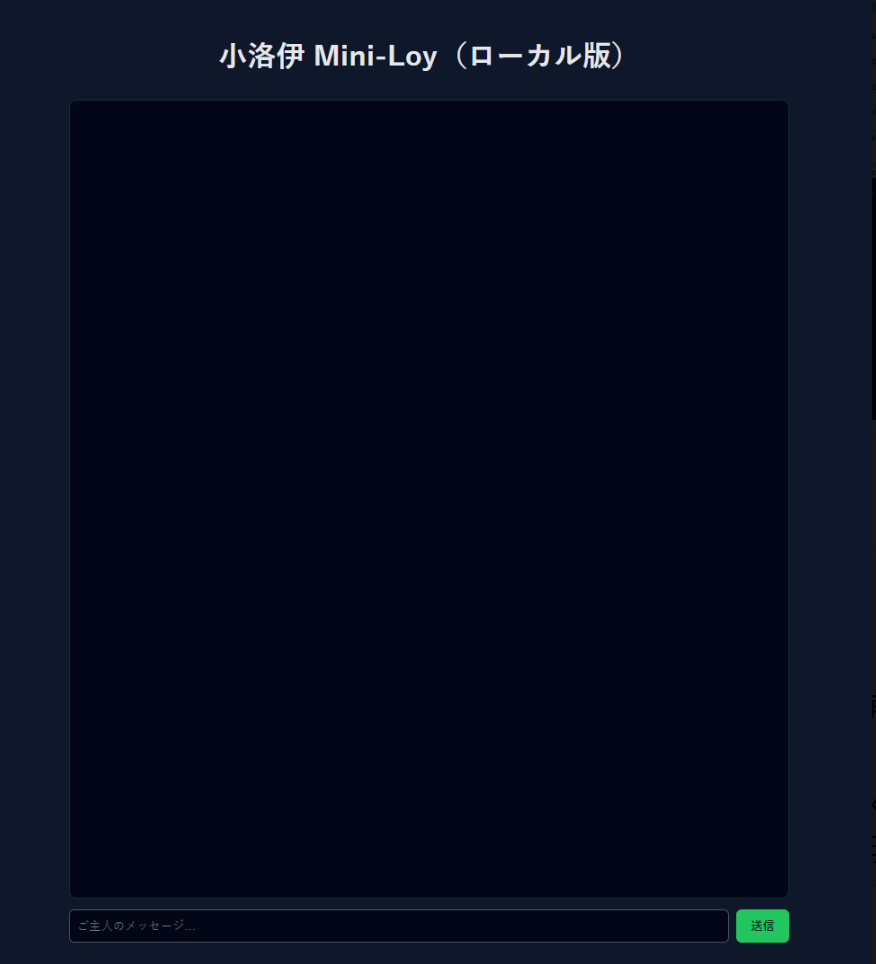
由於還沒有加上前端,這邊我們寫一個網頁頁面來進行對話。

1
2
3
4
5
6
7
8
9
10
11
12
13
14
15
16
17
18
19
20
21
22
23
24
25
26
27
28
29
30
31
32
33
34
35
36
37
38
39
40
41
42
43
44
45
46
47
48
49
50
51
52
53
54
55
56
57
58
59
60
61
62
63
64
65
66
67
68
69
70
71
72
73
74
75
76
77
78
79
80
81
82
83
84
85
86
87
88
89
90
91
92
93
94
95
96
97
98
99
100
101
102
103
104
105
106
107
108
109
110
111
112
113
114
115
116
117
118
119
120
121
122
123
124
125
126
127
128
129
130
131
132
133
<!DOCTYPE html>
<html lang="ja">
<head>
<meta charset="UTF-8" />
<title>小洛伊 Mini-Loy</title>
<style>
body {
font-family: sans-serif;
background: #0f172a;
color: #e5e7eb;
display: flex;
flex-direction: column;
align-items: center;
padding: 16px;
}
#chat {
width: 100%;
max-width: 800px;
height: 70vh;
border: 1px solid #1f2937;
border-radius: 8px;
padding: 12px;
overflow-y: auto;
background: #020617;
box-sizing: border-box;
}
.msg {
margin-bottom: 10px;
padding: 8px 10px;
border-radius: 6px;
max-width: 80%;
white-space: pre-wrap;
word-break: break-word;
}
.me {
background: #1d4ed8;
margin-left: auto;
}
.loy {
background: #111827;
margin-right: auto;
}
#input-area {
width: 100%;
max-width: 800px;
display: flex;
gap: 8px;
margin-top: 12px;
}
#message {
flex: 1;
padding: 8px;
border-radius: 6px;
border: 1px solid #4b5563;
background: #020617;
color: #e5e7eb;
}
button {
padding: 8px 16px;
border-radius: 6px;
border: none;
background: #22c55e;
color: #022c22;
font-weight: bold;
cursor: pointer;
}
button:disabled {
background: #4b5563;
cursor: default;
}
</style>
</head>
<body>
<h1>小洛伊 Mini-Loy</h1>
<div id="chat"></div>

<div id="input-area">
<input id="message" type="text" placeholder="ご主人のメッセージ…" />
<button id="send">送信</button>
</div>

<script>
const chatEl = document.getElementById("chat");
const msgInput = document.getElementById("message");
const sendBtn = document.getElementById("send");

let history = [];

function addMessage(role, text) {
const div = document.createElement("div");
div.className = "msg " + (role === "user" ? "me" : "loy");
div.textContent = text;
chatEl.appendChild(div);
chatEl.scrollTop = chatEl.scrollHeight;
}

async function sendMessage() {
const text = msgInput.value.trim();
if (!text) return;
msgInput.value = "";
addMessage("user", text);

sendBtn.disabled = true;

try {
const res = await fetch("http://localhost:3333/api/chat", {
method: "POST",
headers: { "Content-Type": "application/json" },
body: JSON.stringify({ message: text, history })
});

const data = await res.json();
const reply = data.reply || "(小洛伊沒有回應…)";

addMessage("assistant", reply);

history.push({ role: "user", content: text });
history.push({ role: "assistant", content: reply });
} catch (err) {
console.error(err);
addMessage("assistant", "エラーが発生しました…。バックエンドが起動しているか確認してね、ご主人。");
} finally {
sendBtn.disabled = false;
}
}

sendBtn.addEventListener("click", sendMessage);
msgInput.addEventListener("keydown", (e) => {
if (e.key === "Enter") sendMessage();
});
</script>
</body>
</html>

使用瀏覽器打開後就能直接打字與我們的AI模型回覆,就不用用curl的方式。
替代文字
最後我們加上讀取聲音的部分,最基本的後端就完成了:

1
2
3
4
5
6
7
8
9
10
11
12
13
14
15
16
17
18
19
20
21
22
23
24
async function generateTTS(text) {
try {
const response = await axios.post(
"http://localhost:8001/api/tts",
{
text: text,
voice: "am_puck",
language: "en-us",
speed: 1.0
},
{ responseType: "arraybuffer" }
);

const filename = `tts_${Date.now()}.wav`;
const filepath = path.join(__dirname, "data", filename);
fs.writeFileSync(filepath, response.data);

return "/audio/" + filename;

} catch (err) {
console.error("TTS Error:", err.message);
return null;
}
}
本文作者:Atom
本文鏈接:https://d0ngd.github.io/2026/04/02/洛伊桌寵前端紀錄/
版權聲明:本文採用 CC BY-NC-SA 3.0 CN 協議進行許可