Atom
LINE AI機器人 第二篇

LINE AI機器人 第二篇

新增 天氣查詢、瀏覽器查詢、固定提醒功能

由於CF原本使用的Worker AI改掉了所以這邊要先進行修正。
如果你用的程式碼是直接貼我上一篇的那這邊直接跟著改即可。

更改 Workers AI 模型

原本:

1
2
3
4
5
6
7
const result = await env.AI.run(
"@cf/meta/llama-3.1-8b-instruct",
{
messages,
max_tokens: 256
}
);

改成:

1
2
3
4
5
6
7
const result = await env.AI.run(
"@cf/meta/llama-3.1-8b-instruct-fast",
{
messages,
max_tokens: 256
}
);

新增天氣查詢,使用 open-meteo.com

首先在 handleLineEvent() 裡判斷使用者是不是在問天氣:

1
2
3
4
5
6
7
8
9
10
11
12
13
14
15
16
17
18
19
20
21
22
23
24
25
26
27
28
29
30
31
32
33
34
35
36
37
38
39
40
41
42
43
44
45
46
47
48
49
50
51
52
53
54
55
56
57
58
59
60
61
62
63
64
65
66
67
68
69
70
71
72
73
74
75
76
77
78
79
80
81
82
83
84
85
86
87
88
89
90
91
92
93
94
95
96
97
98
99
100
101
102
103
104
105
106
107
108
109
110
111
112
113
114
115
116
117
118
119
120
121
122
123
124
125
126
127
128
129
130
131
132
133
134
135
136
137
138
139
140
141
142
143
144
145
146
147
148
149
150
151
152
153
154
155
156
157
158
159
160
161
162
163
164
165
166
167
168
169
170
171
172
173
174
175
176
177
178
179
180
181
182
183
184
185
186
187
188
189
190
191
192
193
194
195
196
197
198
199
200
201
202
203
204
205
206
207
208
209
210
211
212
213
214
215
216
217
218
219
220
221
222
223
224
225
226
227
228
229
230
231
232
233
234
235
236
237
238
239
240
241
242
243
244
245
246
247
248
249
250
251
252
253
254
255
256
257
258
259
260
261
262
263
264
265
266
if (isWeatherQuery(text)) {
try {
const weatherReply = await getWeatherReply(text);

await sendReply(
env,
replyToken,
weatherReply
);
} catch (err) {
console.error(
"Weather error:",
err
);

await sendReply(
env,
replyToken,
"唔,我剛剛沒能取得天氣資料。可能是天氣服務暫時沒回應,可以等一下再問我一次嗎?"
);
}

return;
}

//判斷是不是天氣問題
function isWeatherQuery(text) {
return /(天氣|氣溫|溫度|體感|會下雨|下雨嗎|降雨|雨勢|幾度)/.test(text);
}

// 從句子抓地點
function extractWeatherLocation(text) {
let location = String(text || "")
.replace(/[??!!。,,、]/g, " ")
.replace(/洛伊/g, " ")
.replace(
/今天|今日|明天|明日|後天|現在|目前|此刻/g,
" "
)
.replace(
/天氣|氣溫|溫度|體感溫度|體感|降雨機率|降雨|雨勢|會下雨|下雨嗎|下雨|幾度/g,
" "
)
.replace(
/請問|麻煩|幫我|可以|能不能|能否|查一下|查詢|搜尋|看看|查看/g,
" "
)
.replace(
/如何|怎樣|怎麼樣|好嗎|多少|會不會|是否|呢|嗎/g,
" "
)
.replace(/\s+/g, " ")
.trim();

return location || "台北";
}

// 常用地區固定座標

const WEATHER_LOCATION_PRESETS = {
"台北": {
name: "台北",
admin1: "台北市",
country: "台灣",
latitude: 25.0330,
longitude: 121.5654,
timezone: "Asia/Taipei"
},

"新北": {
name: "新北",
admin1: "新北市",
country: "台灣",
latitude: 25.0120,
longitude: 121.4657,
timezone: "Asia/Taipei"
},

"桃園": {
name: "桃園",
admin1: "桃園市",
country: "台灣",
latitude: 24.9937,
longitude: 121.3010,
timezone: "Asia/Taipei"
},

"台中": {
name: "台中",
admin1: "台中市",
country: "台灣",
latitude: 24.1477,
longitude: 120.6736,
timezone: "Asia/Taipei"
},

"東京": {
name: "東京",
admin1: "東京都",
country: "日本",
latitude: 35.6762,
longitude: 139.6503,
timezone: "Asia/Tokyo"
}
};

// 找不到固定地點時,用 Open-Meteo Geocoding

async function geocodeWeatherLocation(locationName) {
const preset =
WEATHER_LOCATION_PRESETS[locationName];

if (preset) {
return preset;
}

const url = new URL(
"https://geocoding-api.open-meteo.com/v1/search"
);

url.searchParams.set(
"name",
locationName
);

url.searchParams.set(
"count",
"1"
);

url.searchParams.set(
"language",
"zh"
);

url.searchParams.set(
"format",
"json"
);

const response =
await fetch(url.toString());

if (!response.ok) {
throw new Error(
`Open-Meteo geocoding ${response.status}`
);
}

const data =
await response.json();

const result =
data?.results?.[0];

if (!result) {
throw new Error(
`找不到地點:${locationName}`
);
}

return result;
}

// 天氣查詢

async function getWeatherReply(text) {
const requestedLocation =
extractWeatherLocation(text);

const place =
await geocodeWeatherLocation(
requestedLocation
);

const url = new URL(
"https://api.open-meteo.com/v1/forecast"
);

url.searchParams.set(
"latitude",
String(place.latitude)
);

url.searchParams.set(
"longitude",
String(place.longitude)
);

url.searchParams.set(
"current",
"temperature_2m,apparent_temperature,relative_humidity_2m,precipitation,weather_code,wind_speed_10m"
);

url.searchParams.set(
"daily",
"weather_code,temperature_2m_max,temperature_2m_min,precipitation_probability_max"
);

url.searchParams.set(
"timezone",
place.timezone || "auto"
);

url.searchParams.set(
"forecast_days",
"3"
);

const response =
await fetch(url.toString());

if (!response.ok) {
throw new Error(
`Open-Meteo forecast ${response.status}`
);
}

const data =
await response.json();

let dayIndex = 0;
let dayLabel = "今天";

if (/後天/.test(text)) {
dayIndex = 2;
dayLabel = "後天";
} else if (/明天|明日/.test(text)) {
dayIndex = 1;
dayLabel = "明天";
}

const daily = data.daily;

const maxTemp =
daily.temperature_2m_max[dayIndex];

const minTemp =
daily.temperature_2m_min[dayIndex];

const rainChance =
daily.precipitation_probability_max[
dayIndex
];

if (dayIndex === 0) {
const current = data.current;

return (
`${place.name}現在是${weatherCodeToText(current.weather_code)},` +
`${current.temperature_2m}°C,體感 ${current.apparent_temperature}°C。\n` +
`今天約 ${minTemp}${maxTemp}°C,最高降雨機率 ${rainChance}%;` +
`濕度 ${current.relative_humidity_2m}%。\n` +
`資料:Open-Meteo`
);
}

return (
`${place.name}${dayLabel}預計${weatherCodeToText(
daily.weather_code[dayIndex]
)},` +
`約 ${minTemp}${maxTemp}°C,` +
`最高降雨機率 ${rainChance}%。\n` +
`資料:Open-Meteo`
);
}

網際網路查詢

這邊使用我平常在用的瀏覽器Brave ,他們的免費額度是每個月1000次,基本上你個人用很難用到超過額度。
超過的話每1000次5美金。

1
2
3
4
5
6
7
8
9
10
11
12
13
14
15
16
17
18
19
20
21
22
23
24
25
26
27
28
29
30
31
32
33
34
35
36
37
38
39
40
41
42
43
44
45
46
47
48
49
50
51
52
53
54
55
56
57
58
59
60
61
62
63
64
65
66
67
68
69
70
71
72
73
74
75
76
77
78
79
80
81
82
83
84
85
86
87
88
89
90
91
92
93
94
95
96
97
98
99
100
101
102
103
104
105
106
107
108
109
110
111
112
113
114
115
116
117
118
119
120
121
122
123
124
125
126
127
128
129
130
131
132
133
134
135
136
137
138
139
140
141
142
143
144
145
146
147
148
149
150
151
152
153
154
155
156
157
158
159
160
161
162
163
164
165
166
167
168
169
170
171
172
173
174
175
176
177
178
179
180
181
182
183
184
185
186
187
188
189
190
191
192
193
194
195
196
197
198
199
200
201
202
203
204
205
206
207
208
209
210
211
212
213
214
215
216
217
218
219
220
221
222
223
224
225
226
227
228
229
230
231
232
233
234
235
236
237
238
239
240
241
242
243
244
245
246
247
248
249
250
251
252
253
254
255
256
257
258
259
// 判斷明確搜尋指令
function extractExplicitSearchQuery(text) {
const match = String(text || "").match(
/^(?:[,,、\s]*)?(?:可以)?(?:幫我)?(?:上網)?(?:查詢|搜尋|搜索|查|找)(?:一下|查看|看看)?[::\s]*(.+)$/i
);

if (!match) {
return null;
}

const query =
match[1]
.trim()
.replace(/[??]+$/, "")
.trim();

return query || null;
}

// 自動判斷需要最新資料
function shouldAutoSearchWeb(text) {
const value =
String(text || "").trim();

if (
/(最新|最近|近期|目前|現在|當前|今天|今日|今年|現任)/
.test(value)
) {
const externalInfo =
/(活動|遊戲|版本|更新|角色|卡池|限定|公告|新聞|消息|資訊|總統|市長|縣長|部長|院長|CEO|執行長|負責人|價格|股價|匯率|排名|冠軍|結果|比分|發布|推出|上市|進度|狀況|狀態|日期|時間|是誰|哪位|誰是|什麼|哪個|哪一個)/;

if (externalInfo.test(value)) {
return true;
}
}

if (
/(新聞|最新消息|最新資訊|近期消息|最近消息|今日消息)/
.test(value)
) {
return true;
}

return false;
}
// 呼叫 Brave Search
async function braveWebSearch(
env,
query
) {
if (!env.BRAVE_SEARCH_API_KEY) {
throw new Error(
"Missing BRAVE_SEARCH_API_KEY"
);
}

const url = new URL(
"https://api.search.brave.com/res/v1/web/search"
);

url.searchParams.set(
"q",
query.slice(0, 400)
);

url.searchParams.set(
"count",
"5"
);

url.searchParams.set(
"country",
"TW"
);

url.searchParams.set(
"search_lang",
"zh-hant"
);

url.searchParams.set(
"ui_lang",
"zh-TW"
);

url.searchParams.set(
"safesearch",
"moderate"
);

url.searchParams.set(
"result_filter",
"web"
);

if (
/(今天|今日|最新|近期|最近|新聞)/
.test(query)
) {
url.searchParams.set(
"freshness",
"pm"
);
}

const response = await fetch(
url.toString(),
{
headers: {
Accept: "application/json",

"X-Subscription-Token":
env.BRAVE_SEARCH_API_KEY
}
}
);

if (!response.ok) {
throw new Error(
`Brave Search ${response.status}`
);
}

const data =
await response.json();

const results =
data?.web?.results || [];

return results
.slice(0, 5)
.map((item) => ({
title:
item.title || "",

url:
item.url || "",

description:
item.description || ""
}));
}
// 搜尋結果交給AI整理
async function searchWebAndAnswer(
env,
user,
query
) {
const results =
await braveWebSearch(
env,
query
);

if (!results.length) {
return `我剛剛幫你查了「${query}」,但沒有找到適合的搜尋結果。`;
}

const searchContext =
results
.map(
(r, index) =>
`[${index + 1}]
標題:${r.title}
摘要:${r.description}
網址:${r.url}`
)
.join("\n\n");

const result =
await env.AI.run(
"@cf/meta/llama-3.1-8b-instruct-fast",
{
messages: [
{
role: "system",
content:
"你是OO,私人 LINE AI 助手。請使用繁體中文。"
},

{
role: "user",
content:
`主人要查:「${query}」\n\n` +
`以下是真正的網路搜尋結果:\n\n` +
searchContext +
"\n\n請只根據以上搜尋結果回答。" +
"不要使用模型記憶補充最新資訊。"
}
],

max_tokens: 650,
temperature: 0.3
}
);

const raw =
result?.response ||
result?.output ||
result?.result ||
"";

const answer =
String(raw).trim();

const sourceLines =
results
.slice(0, 3)
.map(
(r, index) =>
`${index + 1}. ${r.title}\n${r.url}`
);

return (
`我剛剛有實際查網路。\n` +
`${answer}\n\n` +
`來源:\n` +
sourceLines.join("\n")
);
}
// 串進 LINE
const explicitSearchQuery =
extractExplicitSearchQuery(text);

if (
explicitSearchQuery ||
shouldAutoSearchWeb(text)
) {
const query =
explicitSearchQuery || text;

try {
const searchReply =
await searchWebAndAnswer(
env,
user,
query
);

await sendReply(
env,
replyToken,
searchReply
);
} catch (err) {
console.error(
"Web search error:",
err
);

await sendReply(
env,
replyToken,
"唔,我剛剛連不上搜尋服務,可以等一下再叫我查一次嗎?"
);
}

return;
}

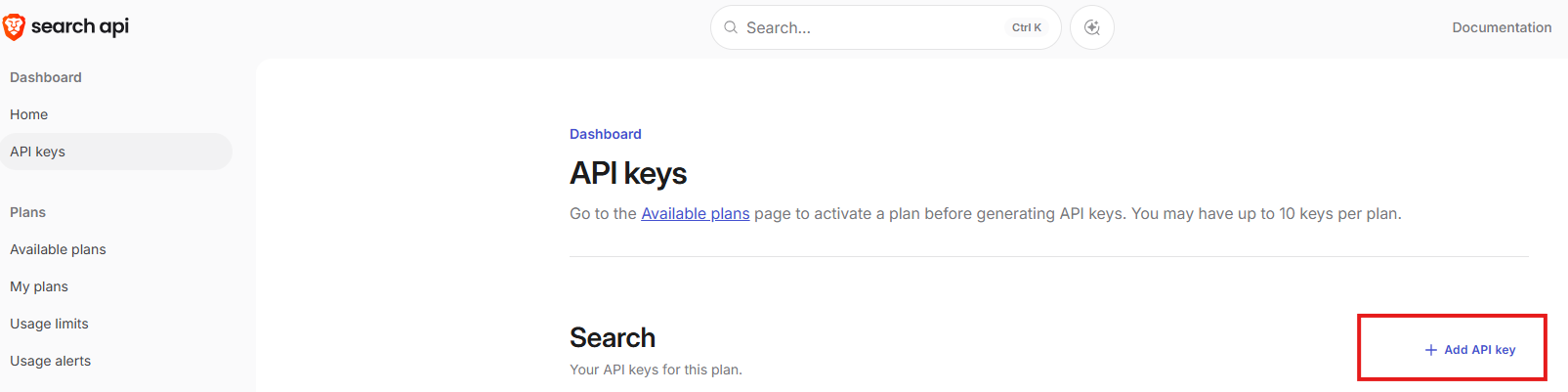
Brave那邊,註冊完後直接選擇0元,然後新增API KEY

替代文字

CF那邊到圖片上面按新增,把API KEY填進去即可。
替代文字

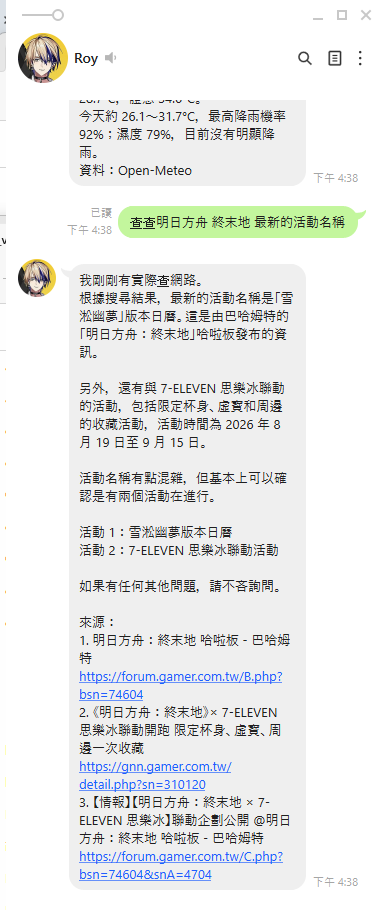
最後是全部更新完後的樣子:

替代文字

本文作者:Atom
本文鏈接:https://d0ngd.github.io/2026/09/02/LINEAI機器人第二篇/
版權聲明:本文採用 CC BY-NC-SA 3.0 CN 協議進行許可